라벨이 GCM인 게시물 표시

Unity3D Android GCM Integration - 3. Send Single, Multi Push(without Server)
이미지
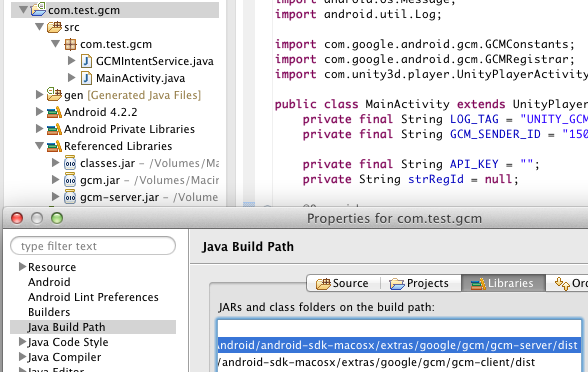
  유니티3D에 안드로이드 GCM 클라이언트 부분인 Sender ID 등록과 푸시 메세지 핸들링 후 알림 띄우기 까지 정리해봤습니다. 이번에는 마지막으로 서버측 처리를 정리하겠습니다. 하지만 미리 언급했듯이 JSP나 PHP등의 서버가 아닌 안드로이드 자바딴에서 클라이언트 + 서버 기능을 사용하는 내용입니다. 1. GCM Server 라이브러리 준비   안드로이드 Jar 프로젝트 빌드를 위해 gcm 서버 기능을 사용하기 위해 gcm-server.jar 파일을 자비 빌드 패스에 추가해줍니다. 위치는 스샷에 보이는 것과 같이 androidsdk/extras/google/gcm/gcm-server/dist 에 있습니다.  당연히 유니티3D 최종 빌드를 위해 플러그인 디렉터리에도 복사를 해줍니다.  마지막으로 androidsdk/extras/google/gcm/gcm-server/lib 에 있는 json_simple-1.1.jar파일을 유니티3D 플러그인 디렉터리에 복사해줍니다. 이것이 없다면 java.lang.NoClassDefFoundError : org.json.simple. JSONValue 오류가 발생합니다. 2. GCM에 단일 또는 멀티로 푸시하기  원래는 자체 서버딴에서 처리해야할 푸시 기능을 안드로이드 프로젝트에 자바로 구현한 부분을 정리해보겠습니다. 아래는 기존 MainActivity에 추가 된 것입니다. public class MainActivity extends UnityPlayerActivity { private final String LOG_TAG = "UNITY_GCM_TEST" ; private final String GCM_SENDER_ID = "xxxxxxxxxxxx" ; // API ACCESS KEY private final String API_KEY = "xxxxxxxxxxxxxxx" ; ...

Unity3D GCM java.lang.NoClassDefFoundError: org.json.simple.JSONValue

이미지
FATAL EXCEPTION: AsyncTask #1 java.lang.Error: FATAL EXCEPTION [AsyncTask #1] Unity version     : 4.1.2f1 Device model      : Acer A500 Device fingerprint: acer/a500_ww_cus1/picasso:4.0.3/IML74K/xxxxxxx:user/release-keys Caused by: java.lang.RuntimeException: An error occured while executing doInBackground() at android.os.AsyncTask$3.done(AsyncTask.java:278) at java.util.concurrent.FutureTask$Sync.innerSetException(FutureTask.java:273) at java.util.concurrent.FutureTask.setException(FutureTask.java:124) at java.util.concurrent.FutureTask$Sync.innerRun(FutureTask.java:307) at java.util.concurrent.FutureTask.run(FutureTask.java:137) at android.os.AsyncTask$SerialExecutor$1.run(AsyncTask.java:208) at java.util.concurrent.ThreadPoolExecutor.runWorker(ThreadPoolExecutor.java:1076) at java.util.concurrent.ThreadPoolExecutor$Worker.run(ThreadPoolExecutor.java:569) at java.lang.Thread.run(Thread.java:856) Caused by: java.lang.NoClassDefFoundError...

Unity3D Android GCM Integration - 2. Sender ID 등록 및 Push 메세지 핸들링 후 알림 띄우기

이미지
  유니티3D 안드로이드 푸시 처리를 위한 GCM 연동 준비작업 을 정리했었습니다. 이번에는 안드로이드 디바이스에서 GCM 푸시를 받을 수 있게 Sender ID를 등록하고 푸시 메세지 핸들링을 처리할 GCMBaseIntentService를 상속받는 GCMIntentService 클래스 클라이언트쪽 작업을 정리해보겠습니다. 자체 서버(JSP든 PHP든) + DB + 운영툴(공지 메세지 보내기)  보통은 GCM 푸시하려면 위와 같은 구조로 서버 구성을 하겠죠. 제가 정리할 내용은 아래와 같은 구조입니다. 자체 서버 없음. 앱 하나에서 GCM Push Send까지 다 함. DB 없음. 등록된 디바이스는 오직 한개라고 정의하고 간단히 멤버변수에 때려박음. 운영툴 없음. GUI TextFiled로 입력받은 스트링을 GCM에 보냄.  한마디로 with out Server 구조입니다. 즉, Client -> GCM -> 동일 Client 이런식이 되는거죠. 혼자 북치고 장구치고 다 하는 튜토리얼입니다. 일반적으론 각자 구현한 Server -> GCM -> Clients 이렇게 되겠죠. 제가 서버 개발자가 아니라서 일단 이렇게 하는데요, 서버와의 연동부분이 필요한 부분은 소스구현없이 따로 살짝 언급하고 진행하도록 하겠습니다. 1. 안드로이드 public class MainActivity extends UnityPlayerActivity { private final String LOG_TAG = "UNITY_GCM_TEST" ; private final String GCM_SENDER_ID = " 1111111111111 " ; private String strRegId = null ; @Override protected void onCreate(Bundle savedInstanceState) { super .on...

Android java.lang.RuntimeException: Unable to start activity ComponentInfo{xxx/xxx.MainActivity}: java.lang.NullPointerException

FATAL EXCEPTION: main java.lang.Error: FATAL EXCEPTION [main] Unity version     : 4.1.2f1 Device model      : Acer A500 Device fingerprint: acer/a500_ww_cus1/picasso:4.0.3/IML74K/1336617649:user/release-keys Caused by: java.lang.RuntimeException: Unable to start activity ComponentInfo{com.test.gcm/com.test.gcm.MainActivity}: java.lang.NullPointerException at android.app.ActivityThread.performLaunchActivity(ActivityThread.java:1956) at android.app.ActivityThread.handleLaunchActivity(ActivityThread.java:1981) at android.app.ActivityThread.access$600(ActivityThread.java:123) at android.app.ActivityThread$H.handleMessage(ActivityThread.java:1147) at android.os.Handler.dispatchMessage(Handler.java:99) at android.os.Looper.loop(Looper.java:137) at android.app.ActivityThread.main(ActivityThread.java:4424) at java.lang.reflect.Method.invokeNative(Native Method) at java.lang.reflect.Method.invoke(Method.java:511) at com.android.internal.os.ZygoteInit$Metho...

Unity3D Android GCM Integration - 1. 준비작업

이미지
  구글의 푸시 기능을 사용하기 위해 구글 API 콘솔에 API 프로젝트를 만들어 Key 생성 까지 해봤습니다. 이번에는 유니티3D 안드로이드 GCM(Google Cloud Messaging) 연동을 정리해보겠습니다. 1. GCM 프로젝트 생성   구글 API 콘솔에서 프로젝트를 만들고 Key를 생성 합니다. 2. 안드로이드 플러그인 프로젝트 생성   유니티3D 안드로이드 플러그인 Jar 프로젝트 를 생성합니다. 저는 com.test.gcm 이라고 만들었습니다. GCM은 안드로이드 2.2부터 지원하므로 최소 요구 SDK를 API 8로 설정해줍니다. 3. Google Cloud Messaging for Android Library 설치 및 임포트  안드로이드 SDK 메니져를 열어서 Extras에 있는 Google Cloud Messaging for Android Library를 인스톨합니다.  GCM은 SDK디렉터리/extras/google/gcm/ 에 설치됩니다. 먼저 클라이언트부터 할 것이니 gcm-client/dist에 있는 gcm.jar 파일을 Java Build Path의 Add External JARs로 추가합니다. 4. AndroidManifest 수정 및 Jar파일 복사     <!-- GCM 퍼미션 -->     < permission android:name = " com.test.gcm .permission.C2D_MESSAGE" android:protectionLevel = "signature" />     < uses-permission android:name = " com.test.gcm .permission.C2D_MESSAGE" />     <!-- GCM 리시버 퍼미션 -->     ...

Unity3D GCM java.lang.NoClassDefFoundError: com.test.gcm.R$drawable

이미지
 유니티3D 안드로이드에 외부 SDK 모듈 연동시에는 R.java와 관련된 이슈가 많네요. 아무래도 이클립스에서 다 관리해서 빌드하는게 아닌 유니티가 복사하고 조합해서 만드는 빌드 과정때문에 이런 이슈가 있는 것 같습니다. 이번에는 GCM 연동중 발생했는데 로그를 보시면, FATAL EXCEPTION: IntentService[GCMIntentService-xxxxxxxxxxxx-1] java.lang.Error: FATAL EXCEPTION [IntentService[GCMIntentService-150503376923-1]] Unity version     : 4.1.2f1 Device model      : Acer A500 Device fingerprint: acer/a500_ww_cus1/picasso:4.0.3/IML74K/1336617649:user/release-keys Caused by: java.lang.NoClassDefFoundError: com.test.gcm.R$drawable at com.test.gcm.GCMIntentService.onMessage(GCMIntentService.java:49) at com.google.android.gcm.GCMBaseIntentService.onHandleIntent(GCMBaseIntentService.java:223) at android.app.IntentService$ServiceHandler.handleMessage(IntentService.java:65) at android.os.Handler.dispatchMessage(Handler.java:99) at android.os.Looper.loop(Looper.java:137) at android.os.HandlerThread.run(HandlerThread.java:60)  이와 같습니다. 많이 보던 로그죠.  페이스북 연동할 때도 같은 에...

Android java.lang.SecurityException: Requires VIBRATE permission

FATAL EXCEPTION: IntentService[GCMIntentService-xxxxxx-1] java.lang.Error: FATAL EXCEPTION [IntentService[GCMIntentService-xxxxxxx-1]] Unity version     : 4.1.2f1 Device model      : Acer A500 Device fingerprint: acer/a500_ww_cus1/picasso:4.0.3/IML74K/1336617649:user/release-keys Caused by: java.lang.SecurityException: Requires VIBRATE permission at android.os.Parcel.readException(Parcel.java:1327) at android.os.Parcel.readException(Parcel.java:1281) at android.app.INotificationManager$Stub$Proxy.enqueueNotificationWithTag(INotificationManager.java:299) at android.app.NotificationManager.notify(NotificationManager.java:124) at android.app.NotificationManager.notify(NotificationManager.java:103) at com.test.gcm.GCMIntentService.onMessage(GCMIntentService.java:54) at com.google.android.gcm.GCMBaseIntentService.onHandleIntent(GCMBaseIntentService.java:223) at android.app.IntentService$ServiceHandler.handleMessage(IntentService.java:65) at android.os.H...

Android GCM Push 기능 연동을 위한 Google API Project와 Sender ID, Server Key 생성하기

이미지
  구글 API 콘솔(Google APIs console) 이라는게 있네요. 구글의 API에 접근할 수 있게 Key를 발급하거나 트래픽 리포트, 팀원 추가를 통한 협업등 구글 API를 이용하는 프로젝트들을 관리할 수 있는 기능을 합니다. 이번 포스팅에서는 푸시 처리용  GCM(Google Cloud Messaging) 서비스를 사용하기 위해서 구글 API 콘솔에서 프로젝트를 생성해서 API Key를 발급 받는 과정을 정리해봅니다. 1. Create Project  먼저 구글에 로그인한 후 구글 API 콘솔 에 접속합니다. 프로젝트가 만들어진 것이 없다면 위와같이 Create project가 뜨고 있다면 대시보드가 나올 듯합니다. Create project를 클릭합니다.  API Project라고 바로 만들어지는데 이 콤보박스를 클릭하면 프로젝트 이름을 바꿀 수 있습니다. 스샷에는 서비스가 하나만 보이지만 수많은 서비스들이 준비되어 있네요. 2. Project ID 설정  Overview를 클릭해 대시보드에보면 Project ID 옆에 Register라고 되어있는 것을 클릭합니다. 그러면 스샷과 같이 Register Project ID 팝업이 뜨고 사용할 프로젝트 ID를 기입합니다. Check availability를 클릭해 사용가능한지 체크 후 Choose this ID를 클릭해 생성합니다.  Project Number라고 보이는 것은 추후에 코드베이스로 연동시 GCM 등록할 때 Sender ID로 쓰이는 값입니다. 3. Services 활성화  Services를 클릭해서 밑으로 스크롤해보면 Google Cloud Messaging for Android가 있는데 그 옆에 OFF를 클릭합니다. Chrome는 구글 크롬 브라우저용이겠죠.  위 스샷과 같이 2번의 약관 동의 과정이 있습니다. 모두 동의를 클릭하고 Accept를 클릭합니다...

Android Caused by: android.os.NetworkOnMainThreadException

이미지
Shutting down VM threadid=1: thread exiting with uncaught exception (group=0x40a461f8) FATAL EXCEPTION: main java.lang.Error: FATAL EXCEPTION [main] Unity version     : 4.1.2f1 Device model      : Acer A500 Device fingerprint: acer/a500_ww_cus1/picasso:4.0.3/IML74K/1336617649:user/release-keys Caused by: android.os.NetworkOnMainThreadException at android.os.StrictMode$AndroidBlockGuardPolicy.onNetwork(StrictMode.java:1099) at java.net.InetAddress.lookupHostByName(InetAddress.java:391) at java.net.InetAddress.getAllByNameImpl(InetAddress.java:242) at java.net.InetAddress.getAllByName(InetAddress.java:220) at libcore.net.http.HttpConnection.<init>(HttpConnection.java:71) at libcore.net.http.HttpConnection.<init>(HttpConnection.java:50) at libcore.net.http.HttpConnection$Address.connect(HttpConnection.java:351) at libcore.net.http.HttpConnectionPool.get(HttpConnectionPool.java:86) at libcore.net.http.HttpConnection.connect(HttpConnection...